


Tutorial
Internet Explorer 7+ has security features that prevent users from uploading images. To use the SpeedEweb system you need to allow image uploading. The easiest way to do this is to add your domain name to Internet Explorer's Trusted Sites.
How to add a URL to your Trusted Sites in Internet Explorer 7+
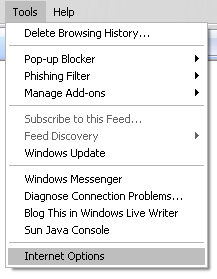
In Internet Explorer 7+, select Tools from the menu bar and then Internet Options.
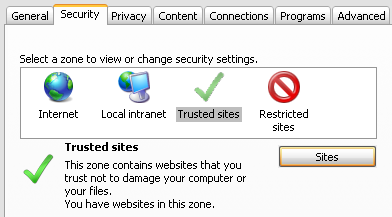
Click the Security tab then select Trusted sites and click the Sites button.
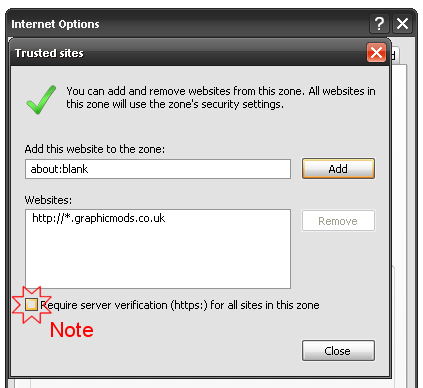
Under Add this website to the zone: enter https://*.www.club-sites.co.uk and click Add then Close.
Finally click Ok and refresh your page (press F5 on your keyboard) and you should see Trusted sites in the status bar at the bottom of the window.
Note
If the security level for this zone is more than medium, please click on Custom level... and enable the following:
- Drag and drop or copy and paste files
- Include local directory path when uploading files to a server
- Submit non-encrypted form data
- Active scripting
- Allow Programmatic clipboard access
- Allow status bar updates via script
- Allow websites to prompt for information using scripted windows